The PlayStation Portal has become an interesting option for PS5 players who want more freedom from their television. Instead of being a traditional standalone gaming handheld, it works as a dedicated way to access compatible PS5 games through Remote Play. It also supports cloud streaming for selected games with a PlayStation Plus Premium membership.
With its large screen, built-in controls, DualSense features and improved software, the PlayStation Portal offers a different way to enjoy the PS5 experience. For players who share a TV or want to play from another room, it can be particularly useful.
What Is PlayStation Portal?
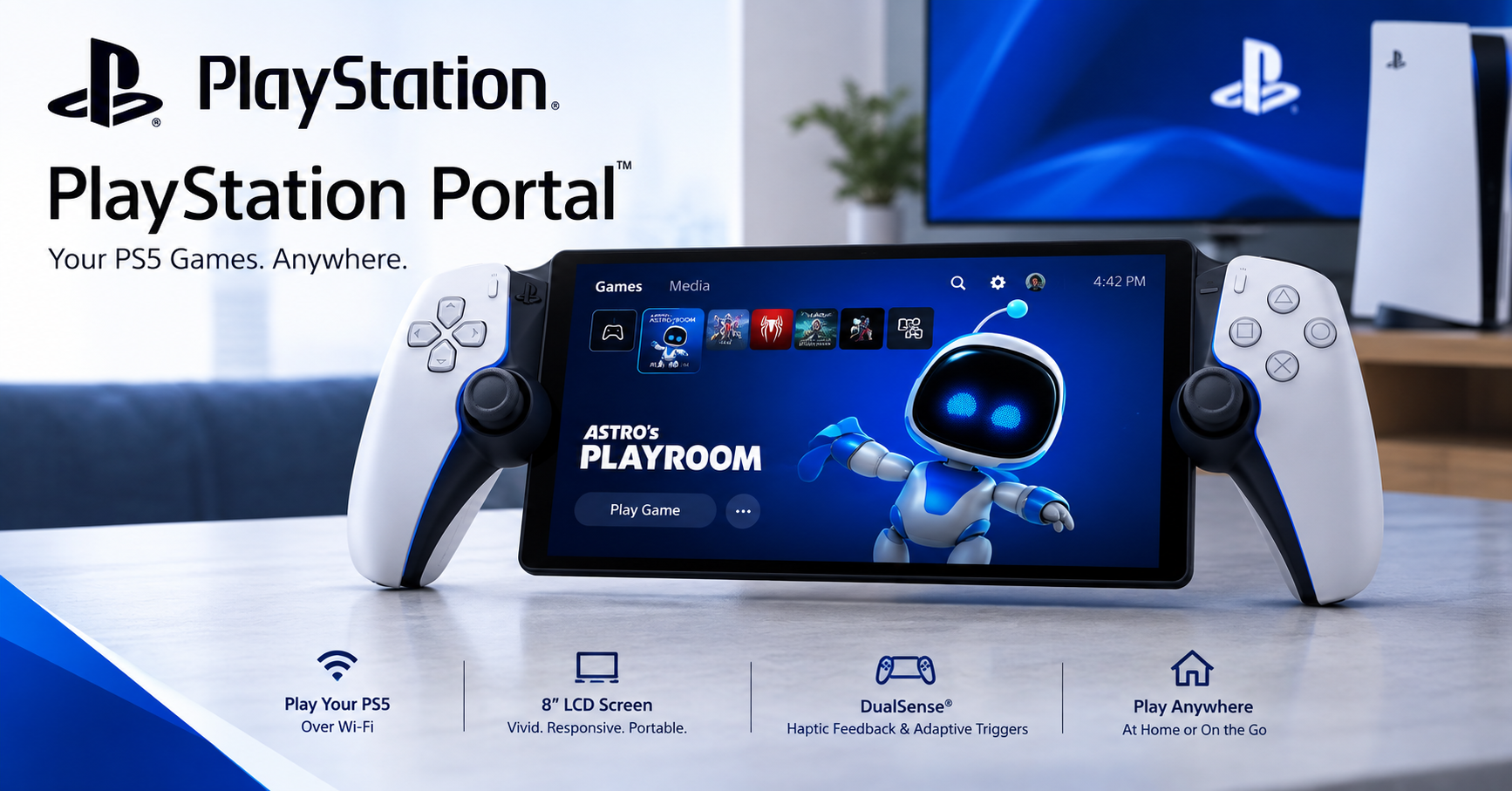
The PlayStation Portal is a remote gaming device designed around the PS5 ecosystem. Unlike a conventional handheld console, it does not run PS5 games locally. Its main purpose is to connect to a PS5 and stream gameplay over Wi-Fi.


Remote Play lets players access compatible PS5 and PS4 games installed on their PS5 console. A PS5 is required for this type of use, while a PlayStation Plus membership is not required for Remote Play itself.
The device has an 8-inch LCD display with 1080p resolution and supports gameplay at up to 60 frames per second. It also includes features associated with the DualSense wireless controller, including haptic feedback and adaptive triggers in supported games.
How PlayStation Portal Remote Play Works
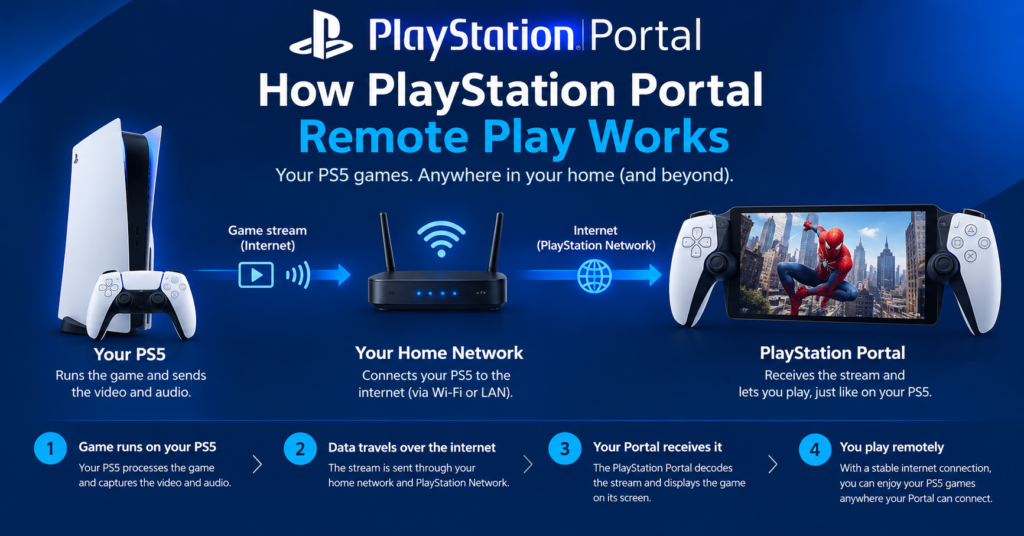
Remote Play is the core feature of PlayStation Portal. Once the device is connected to a compatible PS5, gameplay is transmitted from the console to the Portal over a network connection.
This means your PS5 continues to do the actual game processing. The Portal acts as the screen and controller. You can therefore play from another room without occupying the television connected to your PS5.
A stable internet connection is important. PlayStation states that Portal requires broadband Wi-Fi with at least 5 Mbps, while a connection of 15 Mbps or higher is recommended for a better experience. Actual performance can still depend on network conditions.
PlayStation Portal Cloud Streaming
One of the biggest changes to the PlayStation Portal experience is cloud streaming. Sony introduced official cloud streaming for PS5 games on the device in November 2025 for PlayStation Plus Premium members.
With this feature, compatible games can be streamed directly to the Portal without connecting to a PS5 through Remote Play. Supported games include selected titles from the PlayStation Plus Game Catalog and Classics Catalog, along with select digital PS5 games in a player’s library.
Cloud streaming makes the Portal more flexible because your PS5 does not necessarily need to be active and available for every gaming session. However, only supported games can be streamed, and a PlayStation Plus Premium subscription is required for the cloud feature.
PlayStation Portal Display and Controls
The 8-inch 1080p LCD display is one of the most noticeable parts of the device. Its larger screen provides more space than many smaller handheld displays, making detailed PS5 games easier to view.
The integrated controls are designed around the DualSense experience. Supported games can make use of adaptive triggers and haptic feedback, helping the Portal feel closer to playing with a standard PS5 controller.
Sony has also continued improving the device through software updates. In March 2026, a major update introduced a 1080p High Quality mode for both Remote Play and Cloud Streaming. The setting uses a higher bitrate than the standard 1080p mode to provide improved visual quality.
PlayStation Portal Price in the UK
The recommended UK retail price for PlayStation Portal increased to £219.99 from 2 April 2026. Sony announced the change as part of a global price adjustment affecting the PS5 family and Portal.
Retail prices can vary between stores and may change during promotions. Therefore, buyers should check current pricing before making a purchase.
The price also needs to be considered alongside the device’s requirements. For Remote Play, you need a PS5. For cloud streaming, you need a compatible PlayStation Plus Premium subscription.
Is PlayStation Portal a Standalone Console?
No. The PlayStation Portal is not a standalone PS5 handheld console.
It does not install and run PS5 games in the same way that a traditional gaming handheld runs games locally. Instead, Remote Play streams games from a PS5, while cloud streaming sends supported games from Sony’s servers.
This distinction is important when deciding whether the Portal fits your gaming setup. If you already own a PS5 and want a convenient second screen with integrated controls, it can make sense. If you are looking for a handheld that works independently without the PlayStation ecosystem, it is a different type of product.
PlayStation Portal for Gaming at Home
The Portal can be especially useful at home. Someone watching television can use the main screen while you continue playing your PS5 through the Portal.
It can also be convenient when you want to play from a bedroom or another suitable area with a strong Wi-Fi connection. Because the device is focused on streaming rather than local game processing, network quality plays an important role.
For many PS5 owners, this is the main reason to consider the device. It changes where you can play without requiring a second television.
PlayStation Portal for Gaming Away From Home
Portal can also be used away from home when you have a suitable high-speed Wi-Fi connection. Remote Play can connect to your PS5 remotely, although the quality of the experience depends heavily on both the console’s network and the connection being used by the Portal.
Cloud Streaming provides another option for supported games because the PS5 does not have to be the source of the streamed game. This can make the device more practical for some situations outside the home.
However, it is still important to remember that Portal is dependent on a network connection. It is not designed as an offline handheld for playing downloaded PS5 games.
PlayStation Portal Software Improvements
Sony has continued to expand the Portal’s capabilities since launch. Cloud Streaming significantly changed what the device can do, while later updates added usability and visual improvements.
The March 2026 update added 1080p High Quality mode, improved the cloud-streaming interface, enhanced game invitation notifications and refined trophy notifications. Sony also improved the setup process for users who are creating or signing into a PlayStation account.
These updates show that PlayStation Portal is not simply a fixed Remote Play accessory. Sony continues to develop its software and expand the ways players can use the device.
Is PlayStation Portal Worth It?
Whether PlayStation Portal is worth buying depends mainly on how you play your PS5 games.
For an existing PS5 owner who regularly wants to play without using the main TV, the Portal can be a convenient solution. Its large 8-inch display, integrated controls and DualSense features make it feel more like a dedicated gaming device than using a phone with a controller.
Cloud Streaming also gives PlayStation Plus Premium members another way to access compatible games. This makes the device more versatile than it was when it originally launched.
However, players who want a completely independent handheld should understand its limitations. Portal remains closely tied to network connectivity and the PlayStation ecosystem.
Conclusion
The PlayStation Portal has evolved considerably since its original Remote Play-focused launch. It combines an 8-inch 1080p display with integrated DualSense-style controls and provides a convenient way to access compatible PS5 and PS4 games through Remote Play.
Cloud Streaming has made the device more capable by allowing PlayStation Plus Premium members to stream selected PS5 games without relying on Remote Play from their own console. Recent software updates have also improved image quality and the overall user experience.
For PS5 owners who want more flexibility around the home or access to supported cloud games, PlayStation Portal can be a useful addition to their gaming setup.
FAQs
What Is PlayStation Portal?
PlayStation Portal is a remote gaming device designed for the PS5 ecosystem. It allows compatible games to be played through Remote Play and also supports cloud streaming for selected games with PlayStation Plus Premium.
Does PlayStation Portal Need a PS5?
Remote Play requires a PS5 console. However, supported cloud-streaming games can be played through PlayStation Plus Premium without connecting to your own PS5 through Remote Play.
Can PlayStation Portal Play Games Without Wi-Fi?
depends on a network connection for its main gaming functions. Sony recommends a high-speed connection for a better experience, so it is not designed as an offline gaming handheld.
Does PlayStation Portal Support Cloud Gaming?
Yes. PlayStation Portal supports cloud streaming for selected PS5 games through PlayStation Plus Premium. Compatible games can include titles from the Game Catalog, Classics Catalog and selected digital games in the player’s library.
What Resolution Is the PlayStation Portal Screen?
The PlayStation Portal has an 8-inch LCD display with a 1080p resolution and supports gameplay at up to 60fps.
Does PlayStation Portal Have DualSense Features?
Yes. The integrated controls support DualSense wireless controller features such as haptic feedback and adaptive triggers in supported games.
For more updates visit: GAME TYPES